
Screenshots

App details
- Version
- 9.99
- Size
- 8.10 MB
- Updated
- June 28, 2024
- Requires
- Windows 11
- Language
- Spanish
- License
- Full
- Developer
- Academias Computer
- Category
- Windows OS
SoftPas in:
This product is also available in the following languages:
About Academias Computer
Download Academias Computer – Free Academic Management Software for Schools & Universities
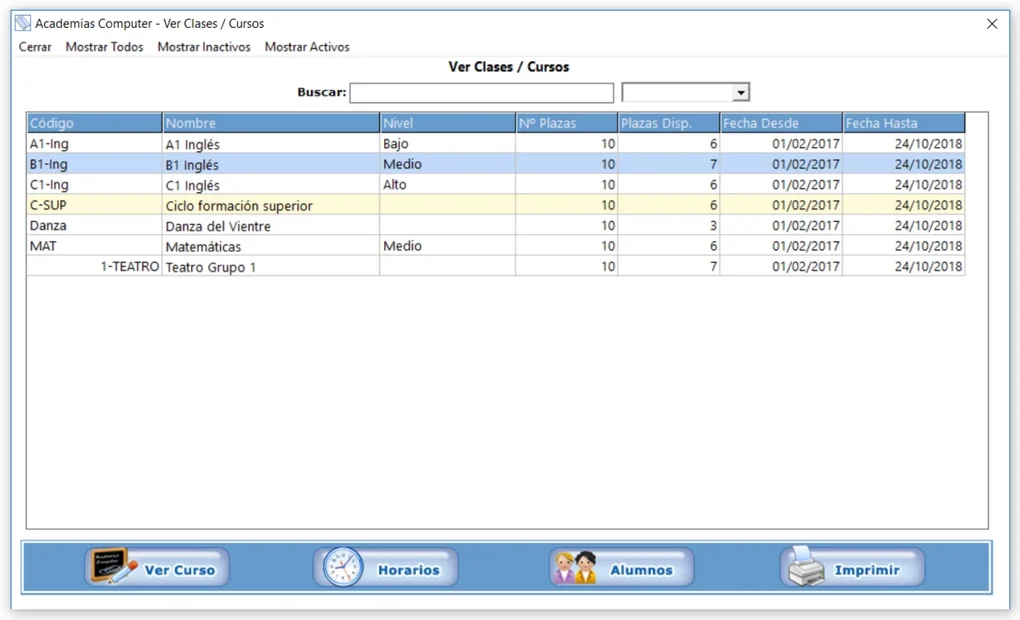
Academias Computer is a powerful, all-in-one academic institution management software designed to simplify the daily operations of schools, colleges, and universities. Whether you're managing student records, teacher schedules, class timetables, or financial billing, this tool delivers a secure, scalable, and user-friendly solution. With support for SEPA-XML file generation, it streamlines banking and invoicing processes, making financial management faster and more accurate. The software supports customizable data fields, allowing institutions to tailor categories like addresses, phone numbers, bank details, IDs, and academic schedules to their specific needs. Available for Windows, Mac, and mobile devices, Academias Computer ensures seamless access across platforms. Its intuitive interface and built-in tutorial guide help users get started quickly, even without technical expertise. Perfect for small academies and large educational organizations alike, this free academic management software offers unmatched versatility and efficiency.
Key Features of Academias Computer
Academias Computer stands out in the educational software market due to its comprehensive and flexible feature set. One of its most powerful tools is the ability to manage student and teacher databases with precision. Each profile can include detailed information such as contact details, enrollment dates, academic records, and attendance logs. The system supports custom fields, so institutions can add unique identifiers like student IDs, parent contacts, or health information without being limited by rigid templates. This adaptability makes it ideal for diverse academic environments, from primary schools to higher education institutions.
Another standout feature is the advanced scheduling engine. Academias Computer allows users to create and manage class timetables, teacher work hours, and room assignments with ease. The drag-and-drop interface simplifies the process of adjusting schedules in real time, reducing conflicts and improving resource utilization. For institutions with multiple campuses or departments, the software supports multi-location management, ensuring consistency and clarity across all sites.
Financial management is made seamless through the built-in SEPA-XML export function. This feature enables institutions to generate compliant payment files for direct bank transfers, simplifying invoicing for tuition fees, course materials, or administrative charges. No more manual data entry into banking systems—just export, send, and receive payments efficiently. Additionally, the software includes reporting tools that generate customizable PDFs and Excel exports for audits, parent meetings, or institutional reviews. With automatic update notifications, users always have access to the latest version with enhanced security and performance.
Installation & Usage Made Simple
Downloading and installing Academias Computer is a straightforward process, especially for users on Windows and Mac platforms. The software is available as a free download from the official website, ensuring a secure and virus-free experience. Once the installer is launched, users are guided through a simple setup wizard that prompts them to choose installation directories and configure basic preferences. The entire process takes less than five minutes, even for those with minimal technical knowledge.
Upon first launch, the software presents a clean, modern dashboard with quick-access icons for students, teachers, schedules, billing, and reports. The built-in tutorial walks users through each module step by step, explaining how to add new records, set up class timetables, and generate SEPA-XML files. For institutions with multiple staff members, the software supports role-based access control, allowing administrators to assign permissions such as read-only access or full editing rights.
Using Academias Computer becomes intuitive with daily use. For example, adding a new student involves filling out a form with personal details, academic level, and enrollment date. The system automatically assigns a unique ID and stores the data securely. Similarly, creating a class schedule involves selecting teachers, rooms, and time slots—then syncing it across all relevant departments. The software also supports batch imports via CSV or Excel files, making it easy to migrate existing data from spreadsheets or legacy systems. With regular updates, the platform continues to evolve, adding new tools and improving performance based on user feedback.
Compatibility & System Requirements
Academias Computer is designed to run smoothly on a wide range of devices, ensuring broad accessibility across academic institutions. It is fully compatible with Windows 10 and later, including Windows 11, providing a stable experience for desktop and laptop users. For Mac users, the software supports macOS 11 Big Sur and above, ensuring compatibility with Apple’s latest hardware and security features.
While the desktop version is the primary focus, Academias Computer also offers a mobile-friendly web interface accessible via Android and iOS devices. This allows teachers and administrators to check schedules, update student records, or approve payments on the go. The responsive design adapts seamlessly to smartphones and tablets, maintaining full functionality without compromising performance.
System requirements are modest, making it suitable for older machines. A minimum of 2 GB RAM, 500 MB of free disk space, and a stable internet connection are recommended. The software does not require a dedicated server—local installation is sufficient for most schools and academies. However, for larger institutions, cloud synchronization options are available through optional add-ons, enabling real-time collaboration across multiple locations.
Security is a top priority. All data is stored locally by default, with optional encryption for sensitive information like student IDs and financial records. The software also supports regular backups to external drives or cloud storage, ensuring data integrity in case of hardware failure. With automatic update checks, users are notified of new versions that include bug fixes, performance improvements, and enhanced security patches.
Pros & Cons of Academias Computer
- Pros:
- Comprehensive academic management with customizable fields
- SEPA-XML export for seamless bank billing and invoicing
- Intuitive interface with built-in tutorial for quick onboarding
- Supports Windows, Mac, Android, and iOS devices
- Free to download and use with optional premium add-ons
- Robust scheduling and reporting tools for efficient operations
- Role-based access control for team collaboration
- Regular updates and strong community support
- Cons:
- Limited cloud-based functionality in the free version
- No built-in email integration for automated notifications
- Advanced features require optional paid upgrades
- Mobile app not available as a standalone download (web-only)
- Initial setup may require data migration from legacy systems
Frequently Asked Questions (FAQ)
Is Academias Computer free to download and use?
Yes, Academias Computer is completely free to download and use for basic academic management tasks. The core features—student and teacher management, scheduling, and SEPA-XML export—are available at no cost. While optional premium add-ons are available for advanced functionality, the free version is robust enough for most schools and small institutions.
Can I use Academias Computer on my Mac or mobile device?
Absolutely. Academias Computer is compatible with macOS 11 Big Sur and later. For mobile users, a responsive web interface is available on Android and iOS devices, allowing access to key features like schedules, student records, and billing through a browser. While there is no standalone mobile app, the web version performs well on smartphones and tablets.
How does the SEPA-XML export feature work?
The SEPA-XML feature allows you to generate standardized payment files for direct bank transfers. After setting up invoices for students or clients, you can export the data as a SEPA-XML file. This file can be uploaded directly to your bank’s system, eliminating manual entry and reducing errors. It’s ideal for institutions that process recurring payments like tuition fees or course charges.
Is my data secure with Academias Computer?
Yes, data security is a priority. By default, all data is stored locally on your device, reducing exposure to online threats. You can also enable encryption for sensitive fields. Regular backups to external drives or cloud services are supported, ensuring your information remains safe and recoverable.
Can I import existing student or teacher data?
Yes, Academias Computer supports batch imports using CSV or Excel files. This makes it easy to migrate data from spreadsheets, legacy systems, or other software. The import wizard guides you through mapping columns to the correct fields, ensuring accurate data transfer with minimal effort.
Final Thoughts & Call to Action
Academias Computer is a standout choice for academic institutions seeking a reliable, secure, and feature-rich management tool. Its ability to handle student records, teacher schedules, financial billing, and customizable data entry makes it a one-stop solution for educational administrators. The inclusion of SEPA-XML export is a game-changer for institutions that deal with frequent payments, while the user-friendly interface ensures minimal training time.
Whether you're running a small private school or managing a large academic department, this software adapts to your needs. With support for Windows, Mac, Android, and iOS, it offers flexibility and accessibility across devices. While the free version is already powerful, the optional upgrades provide room for growth as your institution expands.
Ready to simplify your academic administration? Download Academias Computer today and experience the future of school management—free, secure, and efficient.
Guides & Tutorials
How to install Academias Computer
- Click the Download button above.
- Once redirected, accept the terms and click Install.
- Wait for the Academias Computer download to finish on your device.
How to use Academias Computer
This software is primarily used for its core features described above. Open the app after installation to explore its capabilities.
User Reviews
No reviews yet. Be the first to share your experience.
You may also like
more
Llama 2
Free-to-use large language model As the new addition to Meta’s arsenal of langua...

NotebookLM
Revolutionizing the note-taking and idea-generation process NotebookLM is an exp...

Github co pilot
AI-inspired software development and coding platform GitHub Copilot is a browser...

Google Gemma
Google’s lightweight AI models Introducing Google Gemma , a family of cutting-ed...

AI Image Enlarger
A free app for Windows, by ai-image-larger. AI Image Enlarger is a free software...

DALL E
AI-driven text-to-image transformation engine DALL·E is a free graphic and desig...